


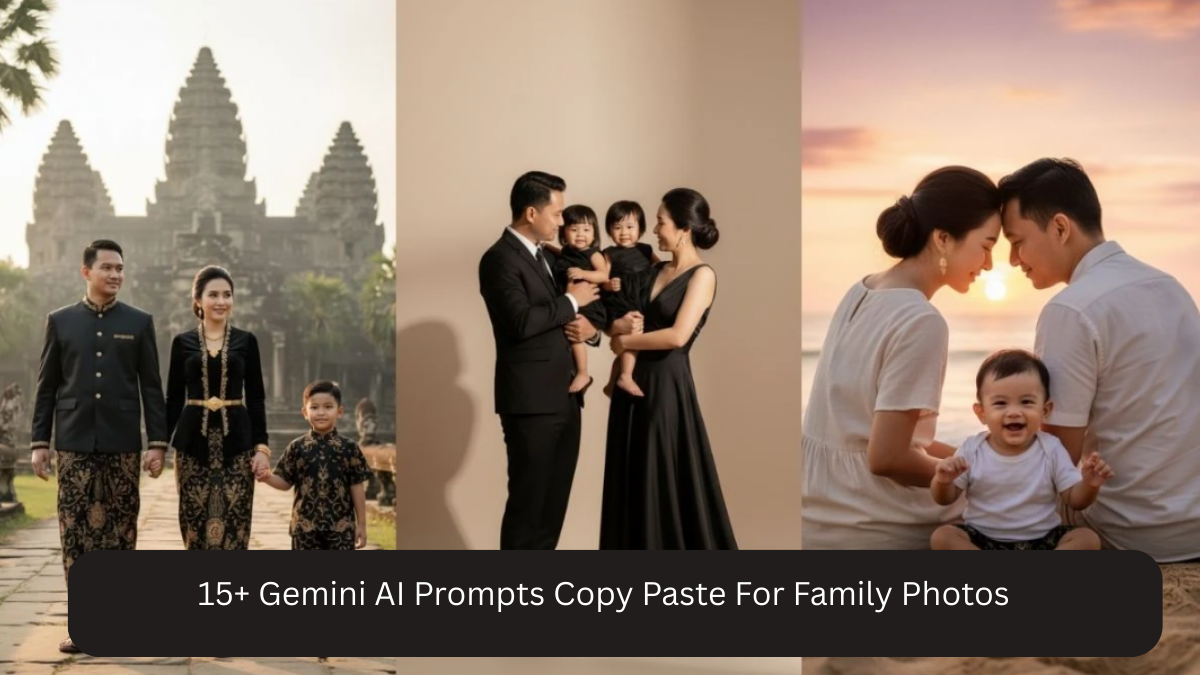
Family photos are more than images — they are memories captured in time. Whether it’s a casual moment at home, a festive celebration, or a formal family portrait, everyone wants photos that feel warm, natural, and timeless. With Google Gemini AI, you can now turn simple family photos into professional DSLR-quality portraits using the right AI prompts.
These prompts help create realistic lighting, natural skin tones, emotional expressions, clean backgrounds, and high resolution results without over-editing. This article shares 15+ Gemini AI prompts that are easy to copy-paste and perfect for family photography.
Why Use Gemini AI for Family Photos

Google Gemini AI can enhance family photos by:
- Improving lighting and clarity
- Maintaining natural facial expressions
- Creating DSLR-style background blur
- Enhancing skin tones without filters
- Producing high-resolution (4K / 8K) images
- Adding warmth and emotional depth
Family photos require realism and softness — not dramatic effects — and Gemini AI performs best when guided with gentle, descriptive prompts.
How to Get the Best Results
Before applying prompts:
- Use a clear photo where faces are visible
- Avoid heavy beauty filters in the original image
- Ensure everyone is facing the camera if possible
- Choose casual, festive, or formal outfits based on the prompt
- Keep expressions natural and relaxed
15+ Google Gemini AI Family Photo Editing Prompts (Copy-Paste Ready)
Prompt 1: Classic Family Portrait
Create a high-resolution DSLR-style family portrait with soft professional lighting, natural skin tones, clean neutral background, sharp facial details, shallow depth of field, warm and realistic family photography look.
Prompt 2: Outdoor Family Photo
Transform this image into a realistic outdoor family portrait with natural sunlight, soft shadows, greenery background, warm tones, DSLR-style depth of field, and authentic emotional expressions.
Prompt 3: Indoor Cozy Family Moment
Edit this photo into a cozy indoor family portrait with soft ambient lighting, warm color tones, natural skin texture, minimal background distractions, and realistic DSLR photography style.
Prompt 4: Festive Family Photo
Create a high-quality festive family portrait with soft warm lighting, traditional outfits, vibrant yet natural colors, sharp details, shallow depth of field, and professional DSLR realism.

Prompt 5: Candid Family Moment
Generate a realistic candid family photo with natural expressions, soft daylight, gentle background blur, warm tones, emotional connection, and DSLR-style clarity.
Prompt 6: Family Photo for Album
Transform this image into a timeless family album portrait with soft studio lighting, neutral background, natural skin tones, sharp focus, and clean professional photography look.
Prompt 7: Family With Kids Portrait
Create a high-resolution family portrait with children, natural lighting, soft shadows, realistic skin tones, gentle depth of field, joyful expressions, and DSLR-style clarity.
Prompt 8: Elegant Formal Family Photo
Edit this photo into an elegant formal family portrait with studio lighting, neutral background, realistic textures, sharp facial details, balanced color grading, and premium DSLR photography style.
Prompt 9: Family Outdoor Evening Shot
Generate a warm evening family portrait with golden hour lighting, soft highlights, natural shadows, subtle background blur, emotional realism, and DSLR-style finish.
Prompt 10: Home Living Room Family Photo
Create a realistic family portrait inside a living room with soft window light, warm color tones, natural skin texture, clean background, and professional DSLR look.
Prompt 11: Traditional Family Portrait
Transform this image into a traditional family portrait with soft studio lighting, realistic skin tones, cultural outfits, clean background, sharp details, and DSLR-quality realism.
Prompt 12: Black & White Family Photo
Generate a classic black and white family portrait with soft lighting, balanced contrast, sharp facial features, emotional expressions, and timeless DSLR photography style.
Prompt 13: Family Group Photo
Edit this photo into a high-resolution family group portrait with even lighting, clear facial focus for everyone, natural color grading, shallow depth of field, and realistic DSLR clarity.
Prompt 14: Family Photo for Framing
Create a frame-ready family portrait with professional studio lighting, neutral background, natural skin tones, sharp details, soft shadows, and premium DSLR photo quality.
Prompt 15: Emotional Family Moment
Transform this image into an emotional family portrait with soft natural lighting, warm tones, realistic expressions, subtle background blur, and authentic DSLR photography style.
Prompt 16: Family Portrait with Grandparents
Generate a high-resolution family portrait including grandparents, soft balanced lighting, natural skin tones for all ages, clean background, emotional warmth, and realistic DSLR look.
Why These Prompts Work Well for Family Photos
These prompts focus on:
- Natural lighting instead of dramatic effects
- Realistic skin textures for all age groups
- Emotional warmth and genuine expressions
- Clean backgrounds to keep focus on faces
- DSLR-style depth without artificial blur
Family photos should feel timeless, not trendy — and these prompts are designed exactly for that.
Tips to Keep Family Photos Natural
- Avoid words like “beauty filter” or “glam”
- Use “natural,” “realistic,” and “authentic” often
- Keep lighting soft and even
- Use warm tones for emotional connection
- Choose neutral or simple backgrounds
Frequently Asked Questions
Q1: Can I use mobile photos for these prompts?
Yes, as long as faces are clear and well-lit.
Q2: Will AI change faces too much?
No, using “natural skin tones” and “realistic” keeps faces authentic.
Q3: Are these good for printing and albums?
Yes. High-resolution outputs are perfect for frames and albums.
Q4: Can I use one prompt for multiple family photos?
Yes, it helps maintain a consistent family album look.
Q5: Can AI fix lighting differences between people?
Yes, Gemini AI balances lighting effectively when prompted correctly.
Conclusion
Family photos deserve warmth, realism, and emotional depth — not heavy filters or artificial effects. With Google Gemini AI and the right prompts, you can transform everyday family pictures into professional, DSLR-quality portraits that feel timeless and genuine.
The 15+ copy-paste prompts in this article are carefully designed to preserve natural expressions, enhance lighting gently, and create high-resolution family photos suitable for albums, frames, social media, and special occasions.
Whether it’s a festive celebration, a cozy indoor moment, or a classic family portrait, these Gemini AI prompts help you capture memories beautifully — just the way family photos should be.