
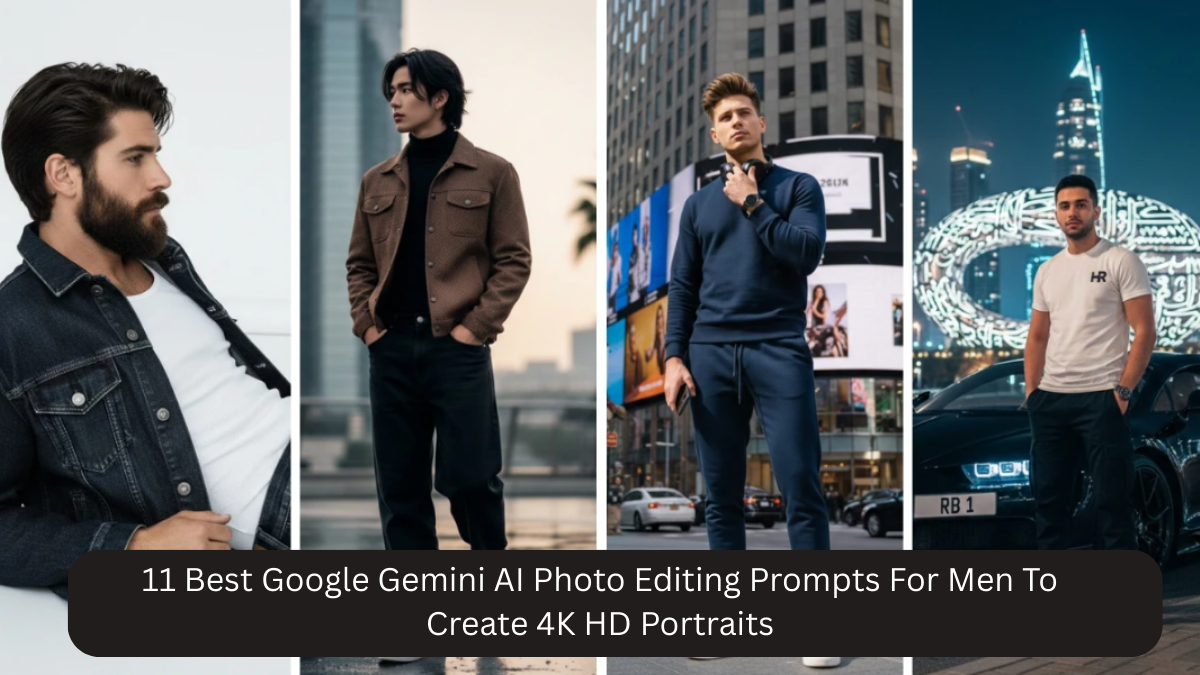
In today’s digital age, your photo often creates the first impression—whether on social media, professional platforms, or personal branding spaces. A sharp, well-edited portrait can instantly elevate how confident, stylish, and trustworthy you appear. Earlier, such results required expensive DSLR cameras, studio lighting, and professional editors. Now, with Google Gemini AI, men can create high-quality 4K HD portraits using simple photos and smart prompts.
The real power of Gemini AI lies in how you guide it. A well-written prompt allows the AI to enhance lighting, skin texture, depth, and mood—without making the image look fake. This article explains the 11 best Gemini AI photo editing prompts for men, describes each prompt in detail, and helps you understand when and why to use them.
Why Google Gemini AI Works So Well for Men’s Portraits
Gemini AI is trained to understand realistic photography concepts. When editing men’s portraits, it focuses on:
- Natural facial structure
- Realistic skin texture without over-smoothing
- Balanced lighting and shadows
- DSLR-style background blur
- Professional color grading
This ensures the final image looks enhanced, not artificial.
How to Prepare Your Photo Before Using AI
For best results:
- Use a clear photo with your face visible
- Avoid beauty filters or cartoon effects
- Natural daylight or soft indoor lighting works best
- Simple backgrounds give cleaner output
- Neutral or confident expressions look more natural
A good base photo dramatically improves the final AI result.
1. Classic Professional Portrait
Prompt:
Create a 4K HD ultra-realistic portrait of a man with natural skin texture, soft professional lighting, subtle shadows, shallow depth of field, clean background, and DSLR photography style.
Explanation:
This prompt is ideal for professional use. It recreates studio-style lighting that evenly highlights facial features while keeping shadows soft. The clean background removes distractions, making the subject look confident and polished. Perfect for LinkedIn, resumes, corporate profiles, and formal branding.
2. Cinematic Portrait Look
Prompt:
Transform this photo into a cinematic portrait of a man with dramatic soft lighting, cinematic color grading, natural skin tones, shallow depth of field, and professional 4K clarity.
Explanation:
This prompt adds a movie-like atmosphere. Cinematic color grading enhances mood and depth, while controlled lighting adds drama without losing realism. Best for Instagram, reels, and creative portfolios where visual impact matters.
3. Clean Studio Headshot
Prompt:
Generate a clean studio headshot of a man with neutral background, balanced lighting, realistic skin tones, sharp facial details, and DSLR-style depth in 4K resolution.
Explanation:
Studio headshots require precision. This prompt balances lighting evenly across the face, ensuring clarity and sharpness. Ideal for business profiles, interviews, and professional portfolios.
4. Modern Casual Style
Prompt:
Edit this image into a modern casual portrait of a man wearing stylish everyday clothing, soft natural lighting, realistic skin texture, muted tones, and clean background with 4K HD quality.
Explanation:
This prompt blends fashion with simplicity. Soft lighting and muted tones keep the image relaxed yet stylish. Great for lifestyle posts, casual branding, and everyday profile pictures.
5. Street Style Editorial
Prompt:
Create a street-style editorial portrait of a man with urban background, muted cinematic tones, soft shadows, natural skin texture, shallow depth of field, and professional 4K finish.
Explanation:
Inspired by fashion magazines, this prompt highlights outfits and posture while adding urban character. The muted tones keep the image classy rather than flashy. Ideal for fashion creators and influencers.
6. Golden Hour Outdoor Portrait
Prompt:
Transform this photo into a golden hour outdoor portrait with warm sunlight, soft highlights, realistic skin tones, gentle shadows, shallow focus, and cinematic DSLR realism in 4K.
Explanation:
Golden hour lighting naturally enhances skin tone and adds warmth. This prompt works beautifully for outdoor, travel, and lifestyle photography, giving a calm and premium look.
7. Moody Editorial Portrait
Prompt:
Generate a moody editorial portrait of a man with cinematic shadows, balanced contrast, subtle color grading, natural facial texture, shallow depth of field, and high-end 4K quality.
Explanation:
This prompt adds emotional depth through controlled shadows and contrast. It’s perfect for artistic portraits, storytelling, and fashion editorials where mood is important.
8. Minimal Aesthetic Portrait
Prompt:
Create a minimal aesthetic portrait of a man with clean background, soft studio lighting, neutral color tones, realistic skin texture, and elegant DSLR-style depth in 4K HD.
Explanation:
Minimal portraits focus on simplicity. This prompt removes distractions and keeps the image modern, clean, and elegant. Ideal for minimal Instagram feeds and branding.
9. Black and White Classic Portrait
Prompt:
Transform this photo into a classic black and white portrait with balanced contrast, soft lighting, detailed facial features, subtle texture, and timeless photography style in 4K.
Explanation:
Black and white portraits emphasize expression and structure. Balanced contrast ensures the image feels classic rather than harsh. Perfect for timeless and artistic content.
10. Soft Natural Look
Prompt:
Edit this image into a soft natural portrait with daylight lighting, gentle shadows, realistic skin texture, minimal retouching, shallow depth of field, and professional 4K clarity.
Explanation:
This prompt keeps things authentic. Minimal editing ensures you still look like yourself, just better lit and more refined. Great for dating profiles and everyday portraits.
11. Confident Timeless Portrait
Prompt:
Create a timeless 4K HD portrait of a man with balanced lighting, natural facial details, muted tones, subtle background blur, and ultra-realistic DSLR photography quality.
Explanation:
This all-rounder prompt suits almost every platform. It balances confidence, clarity, and realism, making it a safe and versatile choice.
Tips for Best Results
- Always include “natural skin texture”
- Avoid over-saturation
- Keep clothing simple
- Use high-resolution export
- Do not mix too many styles
Common Mistakes to Avoid
- Over-editing the face
- Heavy beauty effects
- Poor lighting in original photo
- Mixing cinematic and professional styles
- Cluttered backgrounds
Frequently Asked Questions (FAQ)
Q1: Can I use mobile photos with Gemini AI?
Yes. Clear mobile photos with good lighting work perfectly.
Q2: Will Gemini AI change my facial features?
No. These prompts focus on realistic enhancement, not face alteration.
Q3: Are these prompts suitable for LinkedIn and Instagram?
Yes. Some prompts are professional, while others are creative—choose based on platform.
Q4: Can I customize outfits or backgrounds?
Absolutely. You can mention clothing, colors, or background details in the prompt.
Q5: Is 4K HD output good for printing?
Yes. 4K resolution is ideal for prints and high-quality displays.
Q6: Do I need photo editing knowledge to use these prompts?
No. Simply copy-paste the prompt and upload your photo.
Q7: Why do my results sometimes look over-edited?
This usually happens due to poor lighting or missing “natural skin texture” in the prompt.
Conclusion
With Google Gemini AI, creating sharp, confident, and realistic 4K HD portraits for men is easier than ever. The key lies in choosing the right prompt and understanding what each one does.
These 11 detailed Gemini AI photo editing prompts, along with clear explanations and FAQs, give you full control over your portrait style—whether professional, cinematic, casual, or artistic. With just one good photo and the right words, you can achieve results that once required a full photography studio.