


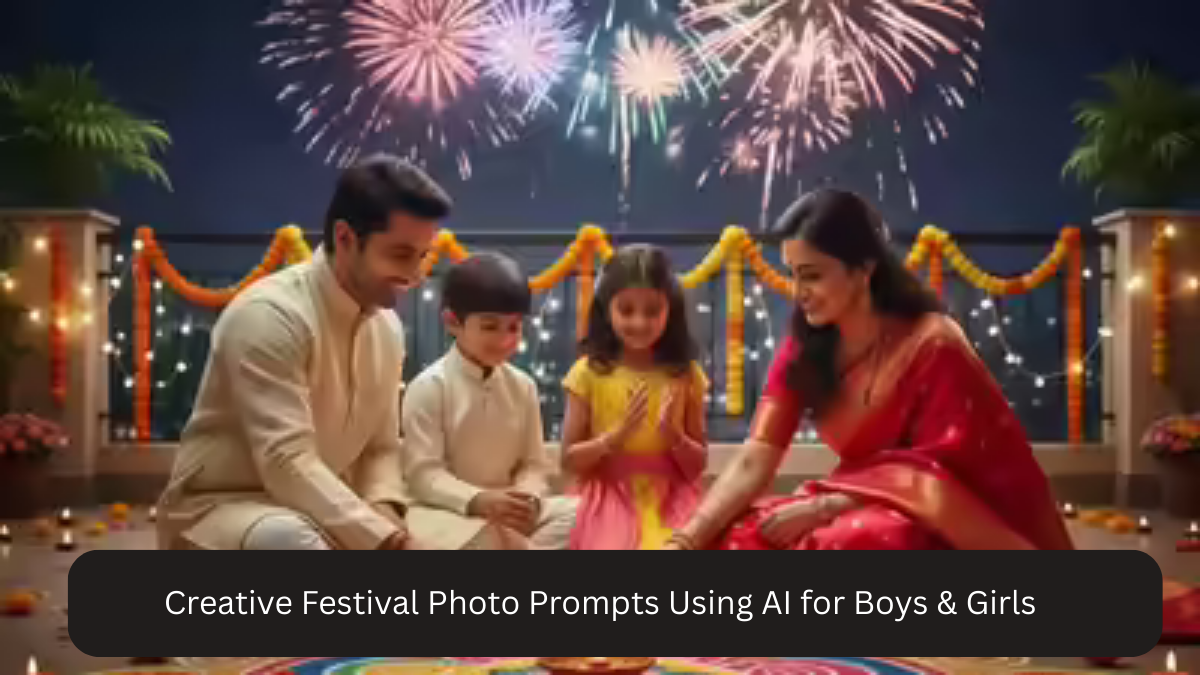
Festivals are moments of color, emotion, culture, and celebration. Whether it’s Diwali, Eid, Holi, Christmas, Navratri, Durga Puja, Pongal, Lohri, Onam, or any cultural festival, photos taken during these times are more than memories—they are expressions of identity and joy. Today, with the power of AI photo editing tools like Google Gemini AI, anyone can turn simple festival photos into professional, cinematic, DSLR-style portraits using well-crafted prompts.
This article shares creative festival photo prompts using AI for boys and girls, focusing on realism, traditional aesthetics, festive lighting, natural skin tones, and high resolution. These prompts are ideal for Instagram, family albums, reels, profile pictures, and festival greetings.
Why Festival Photos Are Perfect for AI Editing

Festival photos already contain rich elements that AI enhances beautifully:
- Traditional outfits with texture and color
- Natural emotional expressions
- Decorative backgrounds like lights, diyas, flowers, rangoli
- Warm lighting and festive ambiance
- Cultural identity and storytelling
AI helps refine these elements by improving lighting, balancing colors, adding DSLR-style depth, and enhancing clarity—without losing authenticity.
How to Prepare Your Festival Photo Before Using AI
To get the most realistic results:
- Use a clear photo with visible face
- Avoid heavy filters or beauty apps beforehand
- Wear traditional or festive clothing
- Choose photos with natural expressions
- Avoid cluttered or overly dark images
Even mobile photos work excellently if lighting is decent.
Creative Festival AI Photo Prompts for Girls
Prompt 1: Traditional Festive Portrait
Create a high-resolution DSLR-style festive portrait of a young woman wearing traditional attire, soft warm festival lighting, natural skin tones, subtle background blur, detailed fabric texture, elegant and realistic festive atmosphere.
Prompt 2: Diwali Glow Look
Transform this photo into a Diwali festival portrait with warm diya lighting, glowing highlights, traditional outfit, soft shadows, realistic skin texture, cinematic depth of field, and festive mood.
Prompt 3: Soft Cultural Elegance
Generate a realistic festive portrait of a girl with minimal makeup, traditional jewelry, soft ambient lighting, natural expressions, pastel festive colors, and professional DSLR photography style.
Prompt 4: Indoor Festival Celebration
Edit this image into an indoor festive portrait with decorative lights in the background, warm tones, soft illumination on the face, natural skin texture, shallow depth of field, and cozy festival vibe.
Prompt 5: Outdoor Evening Festival Look
Create a cinematic festival portrait with evening lighting, glowing decorative lights, traditional dress, soft bokeh background, realistic shadows, and DSLR-quality detail.
Prompt 6: Cultural Festival Editorial Style
Transform this photo into a high-quality editorial festive portrait with balanced lighting, rich traditional colors, clean background, natural skin tones, sharp facial details, and premium DSLR finish.
Creative Festival AI Photo Prompts for Boys
Prompt 7: Traditional Festive Look for Boys
Create a DSLR-style festive portrait of a young man wearing traditional attire, soft warm lighting, realistic skin tones, subtle background blur, confident expression, and clean festive aesthetic.
Prompt 8: Diwali Night Festival Portrait
Transform this photo into a Diwali night portrait with decorative lights, warm highlights, soft shadows, traditional outfit, natural facial texture, cinematic DSLR lighting, and festive mood.
Prompt 9: Minimal Cultural Portrait
Generate a realistic festival portrait of a young man with minimal styling, traditional clothing, natural lighting, calm expression, clean background, and professional DSLR photography look.
Prompt 10: Festive Outdoor Portrait
Edit this image into an outdoor festival portrait with ambient evening light, subtle bokeh, natural color grading, realistic shadows, and high-resolution DSLR-style clarity.
Prompt 11: Elegant Traditional Editorial
Create a premium festive editorial portrait with balanced studio-style lighting, rich traditional colors, sharp outfit textures, natural skin tones, and DSLR-quality depth.
Prompt 12: Family Festival Event Look
Transform this photo into a festive family-event portrait with warm lighting, natural expressions, traditional attire, realistic textures, and professional DSLR photography style.
Creative Festival AI Prompts for Boys & Girls Together
Prompt 13: Couple Festival Portrait
Create a high-resolution festive couple portrait with coordinated traditional outfits, warm lighting, soft background blur, natural skin tones, emotional expressions, and DSLR-style realism.
Prompt 14: Sibling Festival Photo
Generate a realistic festive sibling portrait with joyful expressions, traditional clothing, warm ambient lighting, clean background, and professional DSLR clarity.
Prompt 15: Group Festival Celebration
Edit this image into a high-quality group festival portrait with even lighting on all faces, natural skin tones, festive decorations, balanced color grading, and DSLR-style finish.
Prompt 16: Candid Festival Moment
Transform this photo into a candid festival portrait with natural laughter, soft lighting, realistic motion feel, warm tones, and authentic DSLR photography style.
Why These Festival AI Prompts Work
These prompts are effective because they focus on:
- Natural lighting instead of artificial effects
- Cultural authenticity and traditional colors
- Realistic skin texture across different ages
- DSLR-style depth of field for professional look
- Emotional expressions that feel genuine
Festival photos should feel warm and timeless, not over-edited or artificial.
Tips to Make Festival AI Photos Look More Realistic
- Always include “natural skin tones”
- Use “soft warm lighting” instead of harsh light
- Avoid words like “beauty filter” or “glam”
- Keep colors rich but balanced
- Use shallow depth of field for DSLR feel
Small wording choices dramatically improve results.
Best Use Cases for Festival AI Photos
- Instagram posts and reels
- Festival greeting cards
- WhatsApp display pictures
- Family photo albums
- Wall frames and prints
- Digital invitations
High-resolution AI outputs are suitable for both digital and print use.
Frequently Asked Questions
Q1: Can I use mobile photos for festival AI editing?
Yes, clear mobile photos with good lighting work perfectly.
Q2: Will AI change my face too much?
No, these prompts focus on realism and natural features.
Q3: Are these prompts suitable for all festivals?
Yes, you can customize lighting or outfits for any festival.
Q4: Can I add specific festival elements like diyas or flowers?
Yes, simply mention them in the prompt.
Q5: Are these photos good for printing?
Absolutely. High-resolution outputs are print-ready.
Common Mistakes to Avoid
- Over-sharpening faces
- Too much saturation
- Unrealistic lighting
- Mixing modern glam with traditional style
- Crowded or distracting backgrounds
Festival photos should always feel warm, respectful, and authentic.
Conclusion
Festivals are moments of connection, culture, and celebration—and your photos should reflect that spirit. With Google Gemini AI, creating stunning festival portraits no longer requires expensive cameras or professional studios. All it takes is a clear photo and the right prompt.
These creative festival photo AI prompts for boys and girls are designed to preserve authenticity while enhancing lighting, clarity, and depth. Whether you want a traditional solo portrait, a couple photo, or a family celebration image, these prompts help you create DSLR-quality, realistic, and emotionally rich festival photos that last forever.
By focusing on warmth, natural expressions, and cultural aesthetics, AI becomes a powerful tool to elevate your festival memories—without losing their soul.