
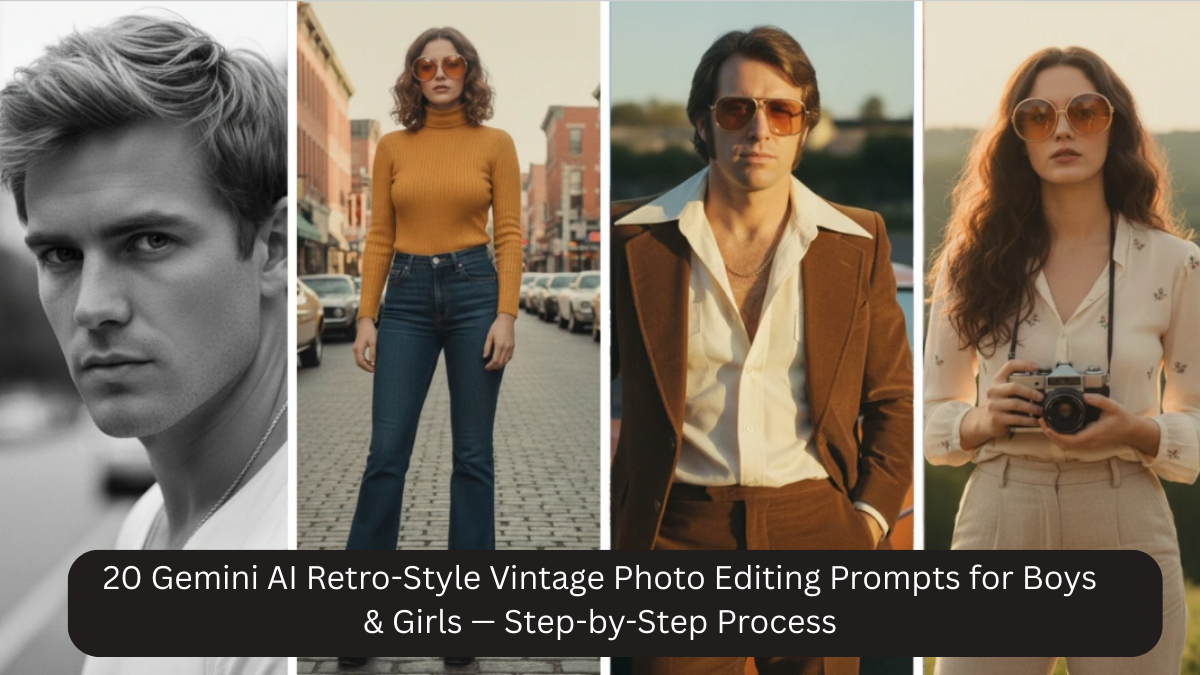
Retro and vintage photography has a timeless charm. Soft colors, nostalgic lighting, film grain, and emotional depth make vintage photos feel authentic and artistic. Today, you don’t need old film cameras or professional studios to achieve this look. With Google Gemini AI, you can transform ordinary photos into retro-style vintage portraits using well-crafted prompts.
This article shares 20 powerful Gemini AI retro-style photo editing prompts for boys and girls, along with a step-by-step process to help you get realistic, DSLR-style, vintage results that look natural—not artificial.
Why Retro & Vintage AI Photos Are So Popular
Vintage photos stand out because they feel emotional and timeless. They work perfectly for:
- Instagram and Pinterest aesthetics
- Profile pictures and reels
- Editorial and fashion content
- Personal memories and albums
- Creative storytelling
Retro AI edits usually feature:
- Muted or pastel color tones
- Soft natural lighting
- Subtle film grain
- Shallow depth of field
- Natural skin texture
- Calm, emotional expressions
Gemini AI can recreate all of this when guided properly.
Step-by-Step Process to Create Retro Vintage Photos Using Gemini AI
Step 1: Choose the Right Base Photo
- Use a clear image with visible facial features
- Avoid heavy beauty filters
- Natural light works best
- Simple background is ideal
Mobile photos work perfectly if lighting is decent.
Step 2: Decide the Retro Mood
Before writing the prompt, decide:
- Indoor or outdoor
- Warm or cool tones
- Soft romantic or cinematic
- Minimal or editorial vintage
This helps you choose the right prompt.
Step 3: Copy & Paste the Prompt
Paste one of the prompts below into Gemini AI and upload your photo. Do not mix too many styles in one prompt.
Step 4: Fine-Tune if Needed
If required, tweak:
- Color tone (warm, pastel, muted)
- Lighting (golden hour, soft window light)
- Background (clean, urban, nature)
Small changes improve realism.
Step 5: Export High Resolution
Always export in 4K or higher for best results, especially for Instagram and prints.
20 Gemini AI Retro-Style Vintage Photo Editing Prompts
Prompt 1: Classic Retro Portrait
Create a 4K ultra-high resolution retro vintage portrait with muted color tones, soft natural lighting, subtle film grain, shallow depth of field, natural skin texture, and timeless nostalgic atmosphere.
Prompt 2: Soft Vintage Aesthetic
Transform this photo into a soft vintage portrait with pastel color grading, gentle shadows, natural expressions, subtle grain texture, and realistic DSLR-style depth.
Prompt 3: Outdoor Retro Look
Edit this image into an outdoor retro portrait with diffused sunlight, warm muted tones, shallow depth of field, film-style texture, and natural skin tones.
Prompt 4: Indoor Vintage Mood
Generate a cozy indoor vintage portrait with soft window light, warm color palette, subtle shadows, realistic skin texture, and classic film photography feel.
Prompt 5: Editorial Retro Style
Create a high-quality editorial retro portrait with muted cinematic tones, clean background, soft lighting, subtle grain, and professional DSLR realism.
Prompt 6: Romantic Vintage Look
Transform this photo into a romantic retro portrait with soft warm lighting, pastel hues, shallow depth of field, gentle film grain, and emotional nostalgic mood.
Prompt 7: Minimal Retro Portrait
Generate a minimal vintage portrait with clean background, muted tones, soft studio lighting, natural skin texture, and timeless aesthetic.
Prompt 8: Golden Hour Vintage
Edit this image into a golden hour vintage portrait with warm sunlight, soft highlights, film grain texture, shallow depth of field, and realistic retro mood.
Prompt 9: Street-Style Vintage
Create a retro street-style portrait with muted urban colors, soft shadows, shallow focus, subtle grain, and cinematic vintage photography look.
Prompt 10: Black and White Vintage
Transform this photo into a classic black and white vintage portrait with balanced contrast, soft lighting, film grain texture, and timeless DSLR photography feel.
Prompt 11: Retro Portrait for Boys
Create a retro vintage portrait of a young man with muted tones, soft lighting, realistic skin texture, shallow depth of field, subtle grain, and classic film aesthetic.
Prompt 12: Retro Portrait for Girls
Generate a retro vintage portrait of a young woman with pastel tones, soft natural light, gentle shadows, film grain texture, and timeless nostalgic mood.
Prompt 13: Nature Vintage Portrait
Edit this image into a nature-inspired vintage portrait with greenery background, diffused sunlight, muted colors, shallow depth of field, and film-style realism.
Prompt 14: Cozy Home Vintage Look
Transform this photo into a cozy home vintage portrait with warm ambient lighting, soft color grading, subtle grain, natural skin tones, and nostalgic feel.
Prompt 15: Artistic Retro Style
Create an artistic retro portrait with muted cinematic tones, soft shadows, film texture, shallow depth of field, and professional DSLR-quality finish.
Prompt 16: Vintage Fashion Portrait
Generate a fashion-inspired vintage portrait with classic styling, soft lighting, muted colors, subtle grain, and editorial retro photography look.
Prompt 17: Emotional Vintage Moment
Edit this image into an emotional vintage portrait with natural expressions, soft lighting, warm muted tones, film grain texture, and authentic nostalgic mood.
Prompt 18: Outdoor Evening Vintage
Create a vintage evening portrait with soft ambient light, warm tones, shallow focus, subtle grain, and cinematic retro atmosphere.
Prompt 19: Clean Retro Profile Photo
Transform this photo into a clean retro profile portrait with neutral background, soft lighting, muted color grading, film texture, and DSLR-style realism.
Prompt 20: Timeless Film Look
Generate a timeless film-style vintage portrait with natural lighting, muted pastel tones, subtle grain, shallow depth of field, and classic photography aesthetic.
Why These Retro Prompts Work So Well
These prompts focus on:
- Natural lighting instead of harsh effects
- Film grain used subtly, not aggressively
- Muted or pastel colors for realism
- DSLR-style depth of field
- Preserving real facial features
This ensures photos look vintage, not fake.
Tips to Make Retro AI Photos Look Authentic
- Always include “natural skin texture”
- Avoid words like “glam” or “beauty filter”
- Use “subtle film grain,” not “heavy grain”
- Keep expressions relaxed and calm
- Use simple backgrounds
Less editing creates better vintage results.
Common Mistakes to Avoid
- Over-sharpening faces
- Too much saturation
- Mixing modern glam with vintage style
- Strong artificial lighting
- Crowded backgrounds
Retro photos should feel soft and timeless.
Frequently Asked Questions
Q1: Can I use mobile photos?
Yes, mobile photos work perfectly with good lighting.
Q2: Will AI change my face?
No, these prompts prioritize realism.
Q3: Are these good for Instagram?
Yes, retro photos perform very well on Instagram and Pinterest.
Q4: Can I customize colors?
Yes, you can specify beige, cream, sepia, or pastel tones.
Q5: Can I print these photos?
Absolutely. Export in 4K for print-ready quality.
Conclusion
Retro-style vintage photography is about emotion, softness, and storytelling. With Google Gemini AI, you no longer need film cameras or advanced editing skills to achieve this look. All you need is a clear photo and the right prompt.
These 20 Gemini AI retro-style vintage photo editing prompts, combined with the step-by-step process, help boys and girls create realistic, DSLR-quality, timeless portraits that feel nostalgic and authentic. Whether for social media, creative projects, or personal memories, these prompts make vintage photography accessible to everyone.